The Great Amazon Flex Package Shuffle: How Do You Organize Your Route?
How do Amazon Flex drivers organize packages? Compare stop-number scanning and AAA, BBB, CCC, DDD sorting methods to save time on deliveries.
There’s more than one way to load an Amazon Flex route. And judging by what we’ve seen at the warehouse, some drivers have turned it into an art form.
If you’ve spent any time picking up packages at an Amazon Flex Sub Same Day (SSD) warehouse, you’ve probably noticed that drivers have some very different approaches to organizing their deliveries.
Some have a carefully developed system. Others appear to be making it up as they go along. And then there are those who somehow manage to fit what looks like an entire Amazon warehouse into a compact car.
Take a look at the photo below.
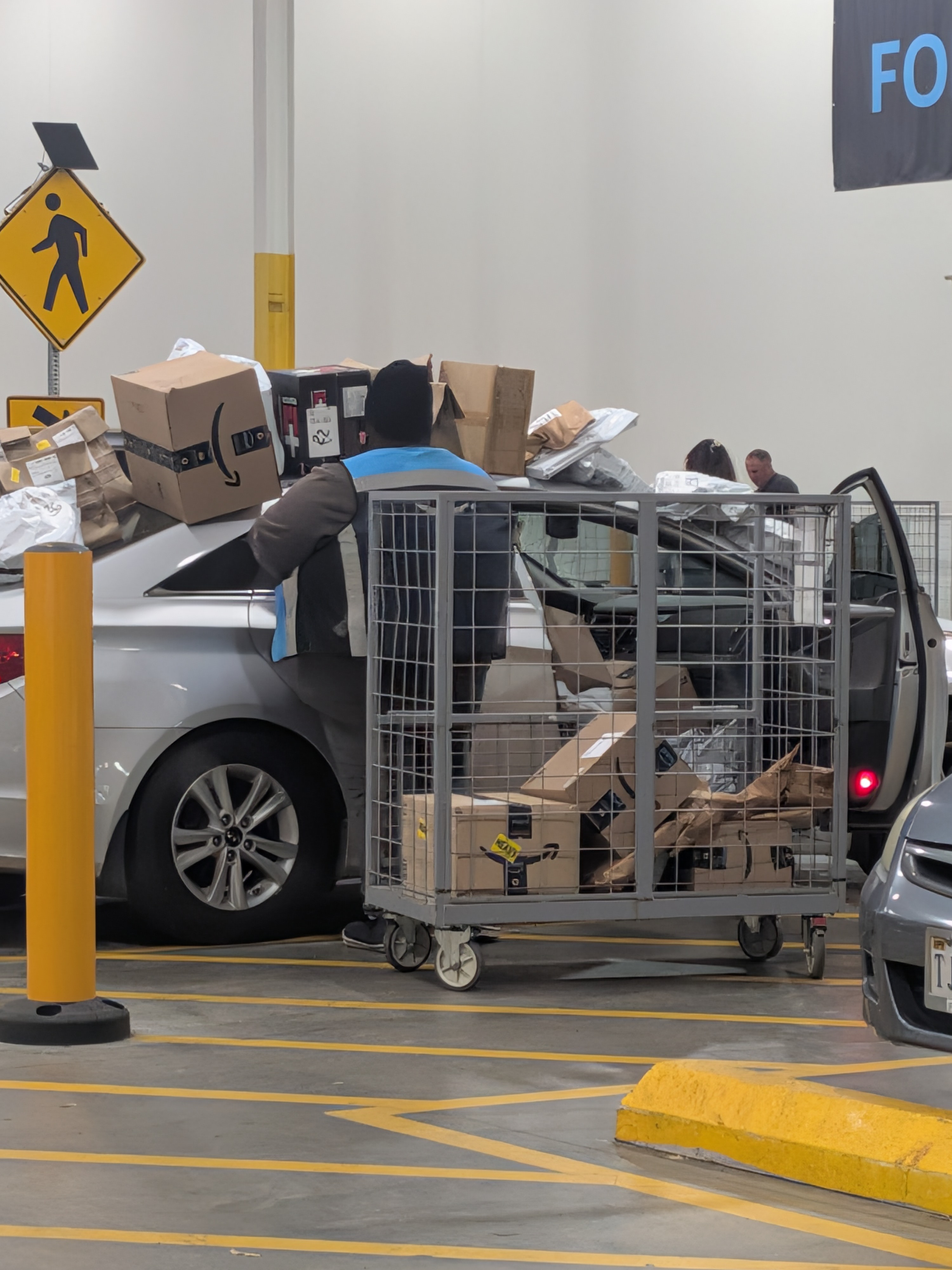
I have to give this guy credit. I was genuinely impressed by his ability to get that many packages into his car. I’m not sure I could have fit half of them in there, much less found anything once I started delivering.
He had packages spread out everywhere while he worked through the process of scanning and marking them with their delivery stop numbers. It looked a little chaotic, but there was clearly a method to the madness.
And that brings us to one of the decisions every Amazon Flex driver has to make: How do you organize your packages so you can actually find them when you need them?
Method 1: The Numerical System
One popular approach is to scan each package using the Amazon Flex app to identify its assigned stop number.
Drivers then write that number on the package, usually with a marker, and organize everything in delivery order.
The idea is pretty simple. Packages for the earliest stops go toward the front, where they’re easiest to reach. Packages for later stops go farther back.
As you work through the route, the packages you need should become progressively easier to find.
There are some obvious advantages to this method.
First, you’re not digging through a pile of packages at every stop trying to find the right one. You’ve already done that work at the warehouse.
Second, scanning each package gives you an opportunity to catch discrepancies before leaving. If you’ve been assigned 40 packages but only have 39, wouldn’t you rather find that out while you’re still at the warehouse?
The downside is time.
Scanning, numbering, and arranging 40 or 50 packages can take a while, particularly when you’re dealing with a mix of boxes, envelopes, and those plastic bags that seem determined to slide off every surface you put them on.
Still, many drivers swear by this method. They would rather spend a little extra time organizing at the beginning than waste time searching at every delivery.
Method 2: The AAA, BBB, CCC, DDD System
Another popular method takes advantage of the small yellow Driver Assist stickers found on most packages at Amazon SSD warehouses.
These stickers generally include one of four codes:
- AAA
- BBB
- CCC
- DDD
Instead of scanning every package to determine its stop number, drivers divide their vehicles into four sections.
For example, AAA packages might go behind the driver’s seat, BBB behind the passenger’s seat, CCC in one section of the cargo area, and DDD in another.
You can arrange the sections however you like. The important thing is remembering where you put each group.
When you arrive at a delivery stop, the Flex app provides information that helps you identify the package, including its Driver Assist code. Rather than searching the entire car, you only have to search one section.
The big advantage is speed at the warehouse.
You’re simply reading the yellow stickers and placing packages into their assigned sections. No need to scan and number every package before loading.
For drivers who want to get out of the warehouse and onto the road as quickly as possible, this can be a very attractive approach.
But there’s a trade-off.
The Problem With Not Scanning Everything
Here’s something worth considering.
When you scan every package individually, you’re doing more than organizing your route. You’re also checking what you’ve actually received.
Warehouse employees are human. Mistakes happen.
You could have a package that doesn’t belong on your route. Or you could be missing one that is supposed to be there.
If you’re simply sorting packages by their yellow stickers, you might not discover a problem until you’re miles away from the warehouse.
And that’s not a particularly convenient time to find out.
If you identify a discrepancy before leaving, you can speak with a warehouse associate and try to get it resolved on the spot.
Once you’ve left, things can become more complicated.
Of course, sorting by Driver Assist code doesn’t prevent you from counting your packages and comparing the total with the app. That’s a useful extra check. But a matching count doesn’t necessarily mean you have all the correct packages. You could have one extra and one missing.
It’s a question of balancing efficiency against certainty.
So Which Method Is Better?
I don’t think there’s a single right answer.
A lot depends on your vehicle, the number and size of your packages, and how comfortable you are with your own system.
If you’re driving a large SUV, you’ve got a lot more flexibility than someone trying to squeeze 45 packages into a sedan.
And if you’ve developed a system that lets you find the correct package in seconds, there’s probably no reason to change it.
Personally, I can see the appeal of both approaches.
The numerical method requires more work up front but gives you a pretty good idea of exactly where everything is. It also provides an opportunity to identify missing or extra packages before you leave.
The AAA, BBB, CCC, DDD method gets you loaded and moving faster, although you may spend a little more time searching for individual packages during the route.
There’s also nothing stopping drivers from developing a hybrid approach. You could sort by Driver Assist code, count the packages, and scan any questionable labels before leaving.
One Final Observation
Watching drivers load their vehicles at an Amazon warehouse is almost entertainment in itself.
Everybody seems to have a system, and some are considerably more elaborate than others.
I’ve seen people carefully arranging packages in neat rows, others working through piles on the pavement, and drivers who seem to be playing a three-dimensional game of Tetris with their cargo space.
And then there’s the gentleman in our photo.
Whatever system he was using, I admire his determination. Getting that many packages into a sedan is impressive enough. Finding them all again during the route is another matter entirely.
At the end of the day, the best organizational system is the one that gets you loaded, keeps your packages accessible, and lets you complete your deliveries without spending half your shift rummaging through the car.
How do you organize your Amazon Flex packages?
Are you a stop-number person, an AAA/BBB/CCC/DDD sorter, or have you developed something entirely different?
We’d be interested in hearing what works for you. After all, some of the best tricks in gig delivery come from other drivers who have already figured out a better way.
---
Driving Surviving — Real experiences, practical advice, and occasional observations from life in the delivery gig economy.